Creating a Promotion with Item Custom Attributes
Use Case: You want to offer a 100% discount on shoes for cart items that have a custom attribute "is_waterproof" set to "true", while excluding items with "is_limited_edition" set to "true".
This promotion targets specific items in the cart based on their custom attributes, allowing you to create highly personalized discounts based on item-level metadata.
Key Conditions:
- The cart must have a minimum subtotal (e.g., $100.00) from items containing the custom attribute.
- The eligible items must have the custom attribute "is_waterproof" set to "true".
- Items with the custom attribute "is_limited_edition" set to "true" are excluded from both the cart condition and the discount.
To set this up in the Promotions Builder:
- In Commerce Manager, go to Merchandise > Promotions > Builder. Edit or create a new promotion.
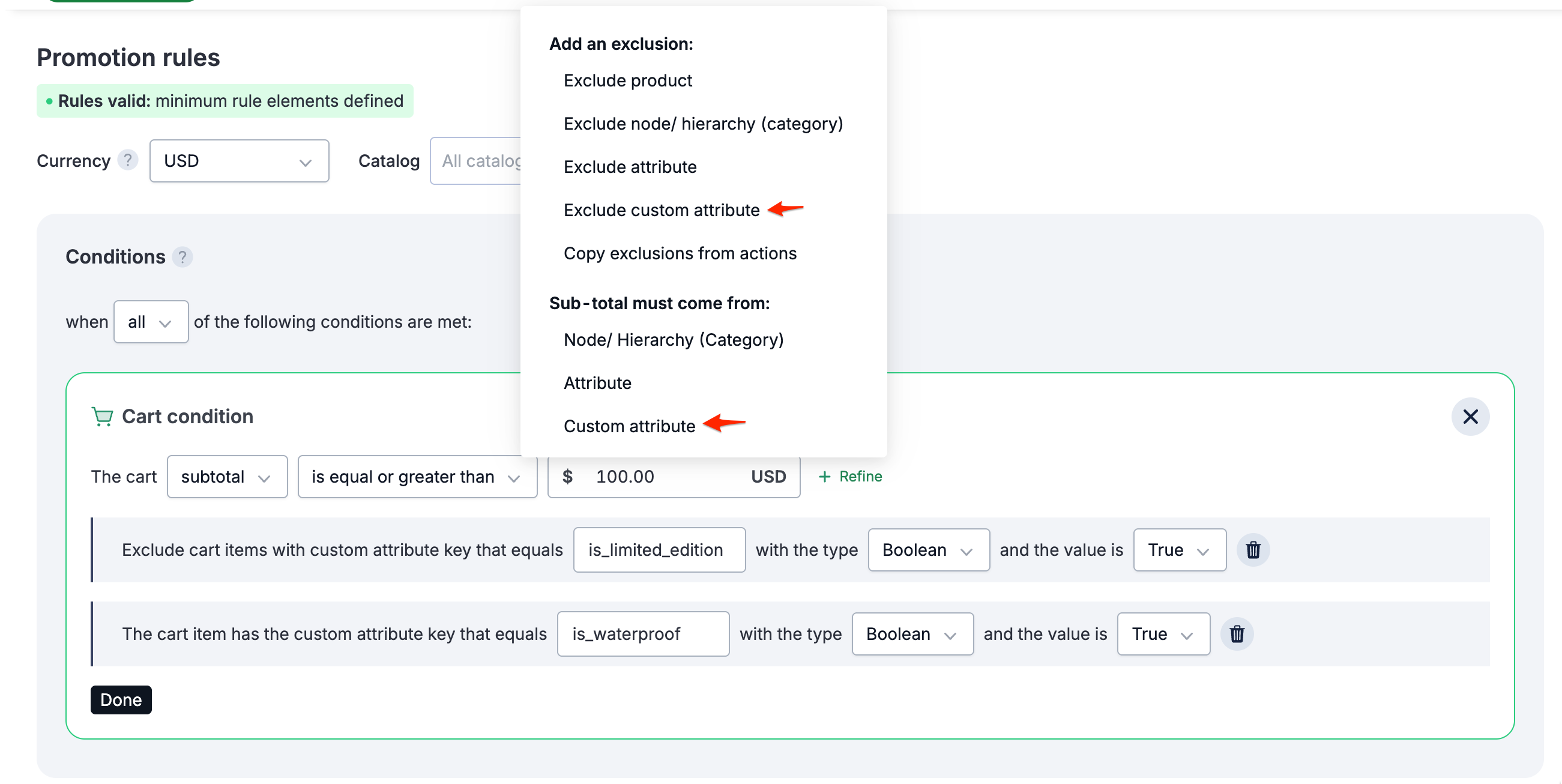
- Create a Creating a Cart Condition with a minimum subtotal requirement (e.g., $100.00).
- Add Cart Item Custom Attribute conditions to refine the cart condition:
- Exclude items with custom attribute "is_limited_edition" (Boolean type) set to "true"
- Include items with custom attribute "is_waterproof" (Boolean type) set to "true" to ensure only items with this attribute count toward the subtotal
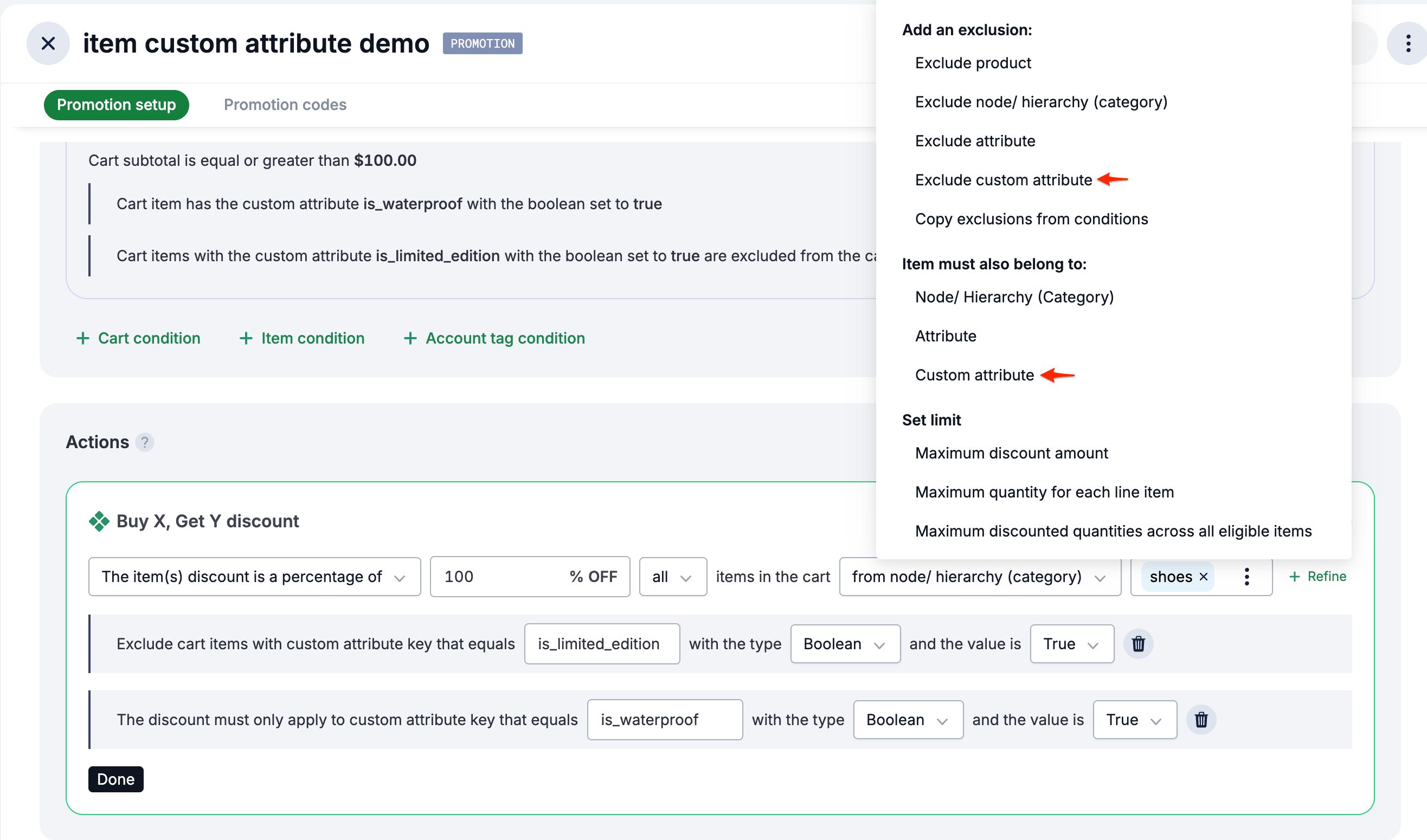
- In the Actions section, create a Buy X, Get Y discount with 100% off for items from a specific category (e.g., shoes).
- Click +refine on the BXGY action to add inclusions and exclusions:
- Under Add an exclusion, select Exclude custom attribute and set "is_limited_edition" (Boolean type) to "true" to exclude items with this attribute from the discount.
- Under The discount must only apply to, select Custom attribute and set "is_waterproof" (Boolean type) to "true" to apply the discount only to items with this attribute.
- Setup promotion code if the promotion has Coupon-driven toggle ON (by default). See Creating promotion codes.
See the following images:
Result:
When a shopper adds items to their cart:
- The promotion applies only when the cart subtotal is $100.00 or more from items with the custom attribute "is_waterproof" set to "true" (excluding items with "is_limited_edition" set to "true").
- Shoes from the specified category with the custom attribute "is_waterproof" set to "true" receive a 100% discount (free)
- Shoes with the custom attribute "is_limited_edition" set to "true" are excluded from both the cart subtotal calculation and the discount
For example, if a shopper has:
- 2 waterproof shoes ($50 each) = $100 subtotal from waterproof shoes → Promotion applies, waterproof shoes are free
- 1 waterproof shoe ($50) + 1 limited edition shoe ($60) = Only $50 from waterproof shoes → Promotion does not apply (subtotal requirement not met, the limited edition is excluded)
- 2 waterproof shoes ($50 each) + 1 limited edition + waterproof shoe ($100) + 1 regular shoe ($100) = $100 from waterproof shoes → Promotion applies, only waterproof shoes are free (the limited edition and regular shoes are excluded from discount).
Key Features Demonstrated
This promotion example showcases several advanced features:
- Cart condition with item custom attributes: Use item custom attributes to determine which items count toward the cart subtotal requirement.
- Item-level custom attribute inclusions: Target specific items for discounts based on their custom attributes.
- Item-level custom attribute exclusions: Exclude specific items from discounts based on their custom attributes.